
Internet Speed Meter Pro - 4G Speed Test2.3.4 - Google Play
Please wait ... The app listing is being verified for availability.
You'll be able to see results in few seconds.
You'll be able to see results in few seconds.
Publisher Description
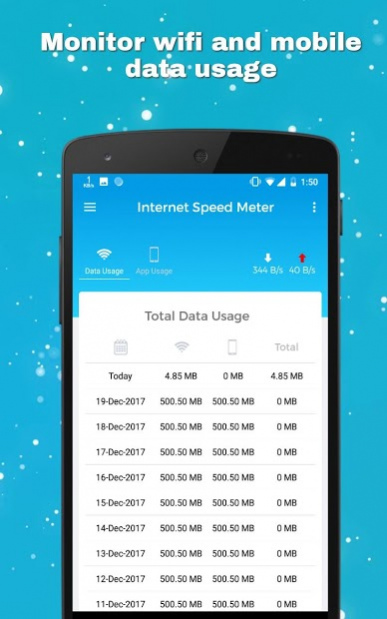
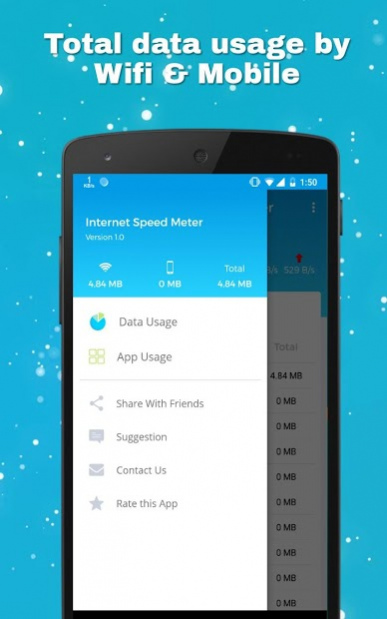
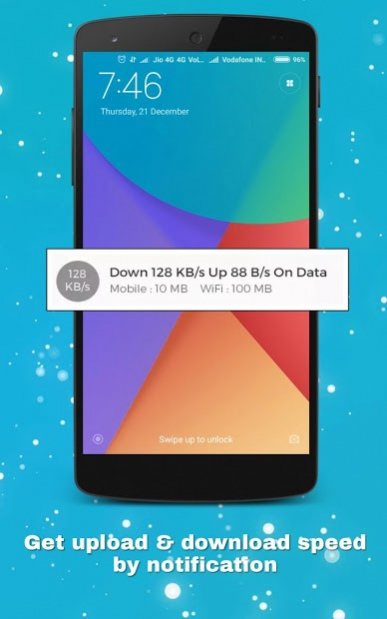
for show live internet speed on notification and screenlock. Monitoring your monthly data usage.
Internet Speed - 4G Fast
is used to check current download and upload speed of you internet like Wifi, 3G, 4G and Broadband.
- Wifi Speed check
- 3G Speed check
- 4G Speed check
- Broadband Speed check
No need to open your browser or questionable apps. Install this great Android tool and always know how fast is your internet connection. On top of that the app saves your internet speed data every week, day and month and you can easily analyze the changes.Internet Speed Monitor, WiFi Speed in Status bar.
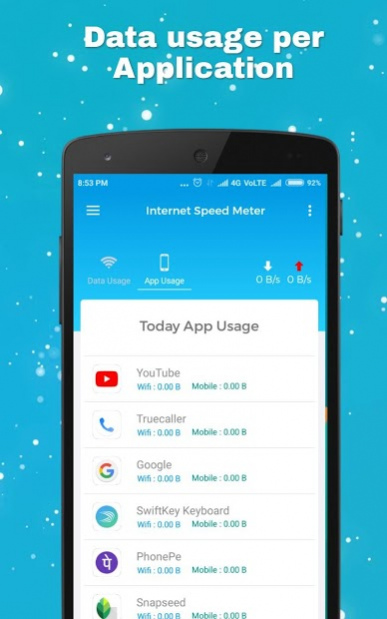
By using this you can easily monitor which apps are draining your internet connection and save it up.Network Speed Indicator.
Network speed meter
show real-time data/internet usage on home screen like datally. So you can easily identify usage of internet & get idea to plan strategy to minimize usage of network data. Internet Speed, Internet Speed Test.
Key features:
• Real-time internet speed in status bar
• Shows Data usage per app. Easily identify most data-hungry apps in your device.
• Track and monitor daily data and WiFi usage from notification
• Monitors traffic data for the last 30 days, Daily, Weekly, Monthly & Yearly.
• Set Billing cycle for metered and unmetered network separately.
• Hide when not connected to any network
• Unobtrusive notification to let you focus on what's important
• Simple, intuitive design and easy to use UI.
• Daily Mobile and WiFi usage summary notification.
• Displays all statistics in Bar Graphs & Pie Charts.
• Only app on play store, having Hotspot usage
• Check Background and foreground usage for each app.
• Internet Speed Meter is a Data Manager who Monitor, Manage and count data usage.
• It shows Network Speed(WiFi, 5g,3G,4G) in Status-bar.
• Highly customizable
• Battery and memory efficient
• No ads, No bloat
About Internet Speed Meter Pro - 4G Speed Test
Internet Speed Meter Pro - 4G Speed Test is a free app for Android published in the System Maintenance list of apps, part of System Utilities.
The company that develops Internet Speed Meter Pro - 4G Speed Test is Power Video Player. The latest version released by its developer is 2.3.4.
To install Internet Speed Meter Pro - 4G Speed Test on your Android device, just click the green Continue To App button above to start the installation process. The app is listed on our website since 2019-04-25 and was downloaded 0 times. We have already checked if the download link is safe, however for your own protection we recommend that you scan the downloaded app with your antivirus. Your antivirus may detect the Internet Speed Meter Pro - 4G Speed Test as malware as malware if the download link to com.internet.speedmeter.speedtest4gnew is broken.
How to install Internet Speed Meter Pro - 4G Speed Test on your Android device:
- Click on the Continue To App button on our website. This will redirect you to Google Play.
- Once the Internet Speed Meter Pro - 4G Speed Test is shown in the Google Play listing of your Android device, you can start its download and installation. Tap on the Install button located below the search bar and to the right of the app icon.
- A pop-up window with the permissions required by Internet Speed Meter Pro - 4G Speed Test will be shown. Click on Accept to continue the process.
- Internet Speed Meter Pro - 4G Speed Test will be downloaded onto your device, displaying a progress. Once the download completes, the installation will start and you'll get a notification after the installation is finished.
Program Details
System requirements
Operating systems
Android
Download information
File size
4.7 MB
Total downloads
0
Pricing
License model
Free
Price
Version History
Here you can find the changelog of Internet Speed Meter Pro - 4G Speed Test since it was posted on our website on 2020-03-18. The latest version is 2.3.4 and it was updated on Apps112 on 02 November, 2026. See below the changes in each version:
version 2.3.4
posted on 2019-04-25
*New Setting menu added.
*Bug fixed.
*Free VPN Added Soon.
version 2.3.4
posted on 2019-04-25
*New Setting menu added.
*Bug fixed.
*Free VPN Added Soon.
Disclaimer
Official Google Play Link
We do not host Internet Speed Meter Pro - 4G Speed Test on our servers. We did not scan it for viruses, adware, spyware or other type of malware. This app is hosted by Google and passed their terms and conditions to be listed there. We recommend caution when installing it.
The Google Play link for Internet Speed Meter Pro - 4G Speed Test is provided to you by apps112.com without any warranties, representations or guarantees of any kind, so access it at your own risk.
If you have questions regarding this particular app contact the publisher directly. For questions about the functionalities of apps112.com contact us.
